
I’ve been performing internal assessments for six years and out of all the things I have learnt, one is certain: without a proper tiering model, security tools alone won’t stop your organization from collapsing after a major compromise.
In this post I’ll explain what a tiering model is, how to break a flat network even when protections are present, and, most importantly, how to build a defense-in-depth network providing practical tips and diagrams.
I / About tiering models history and why flat networks fail
The first resource talking about tiering model that I remember of is a talk given by Aurélien Bordes in 2017 at the French conference, the SSTIC:
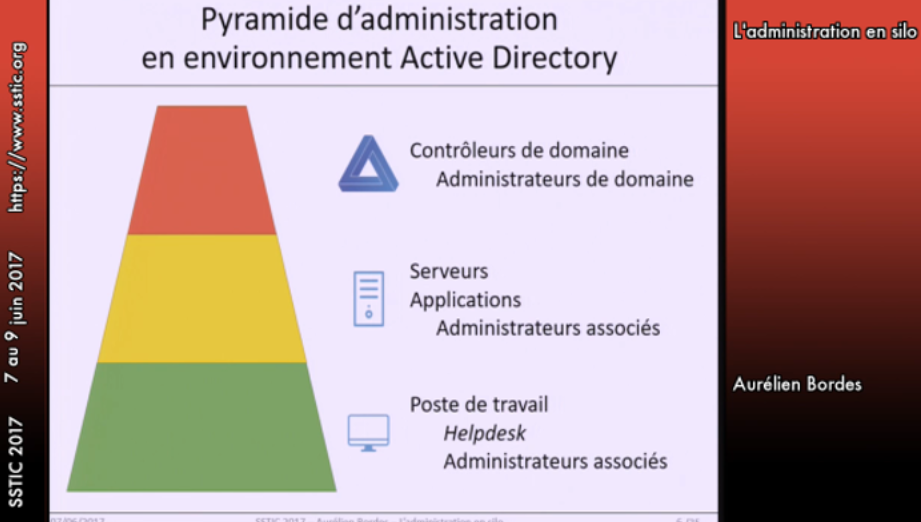
That was eight years ago, in 2017, and just to put that into perspective, at the time I was still learning about XSS and basic web vulnerabilities. Eight years later we should expect things to have changed… but they haven’t. In most of my internal assessments, I still find networks exposing all their assets without any segmentation:
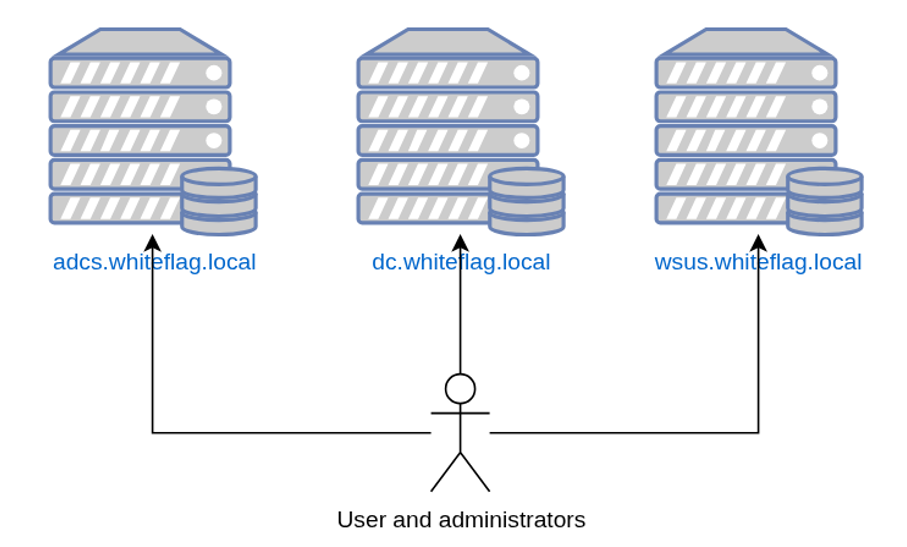
That is an issue because servers expose administrative services such as RDP, SSH or WinRM, administrative interfaces such as Tomcat interfaces with defaults credentials or even monitoring interfaces with known vulnerabilities. These are easy targets that hackers quickly find on an internal network because we have developed tools that allow us to map an entire domain quite easily.
Furthermore, on flat networks admins sit on the same switches as attackers. That lets us tamper with their traffic, capture authentication exchanges, or even pull clear text passwords from Wireshark captures because many protocols still run without TLS. Yeah I’m talking about you LDAP.
There are literally tens of techniques that can be used by hackers to escalate from unprivileged attacker to sysadmin or even domain admin accounts. One of the most common paths is obtaining initial admin access on a Windows Server. Know why ? Because these are systems where privileged users are connected and if they are connected, there is a high probability that their credentials remain in memory, specifically inside the LSASS process which processes authentications on Windows:
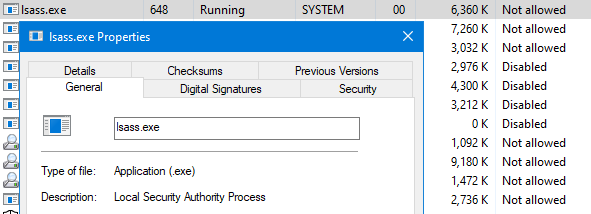
When authenticating, LSASS validates your credentials in order to log you in. But it also keeps these credentials inside its process’ memory for further usage (re-authenticate you for example). Credentials are stored as:
- Clear text credentials (your password as entered)
- The NT hash, derived from your clear text password using the MD4 hashing algorithm
- Kerberos tickets, which are pretty much like your national ID card holding your name, the groups you are in and your privileges.
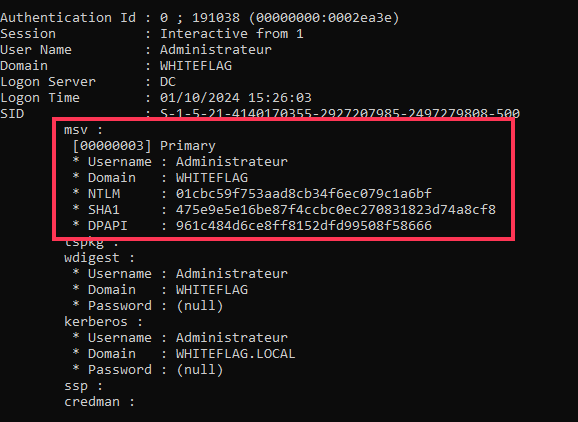
Since this process contains authentication secrets, it is often targeted by attackers that try to dump its content in order to retrieve them. Below is a dump of the credentials of the Administrateur user from the WHITEFLAG domain using Mimikatz:
As such, if an attacker compromises a single server or workstation, he could, depending of the privileges of the users connected on the system, compromise their passwords and replay them over other assets trying to compromise more systems:
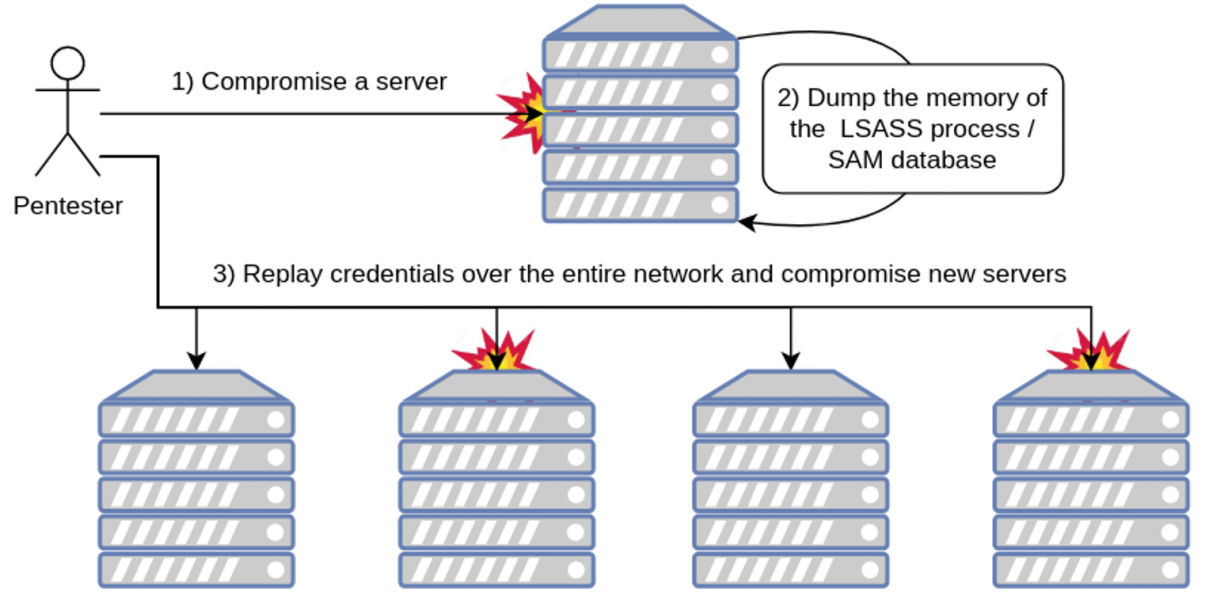
In our case, we retrieved the NT hash of the Administrateur account, a domain admin, and, because of the Pass-The-Hash attack, we can use this hash to authenticate as the Administrateur on multiple systems at the time, including the domain controller, via NetExec:

The domain fallen, game over. What do we do now?
When a company gets compromised because of an LSASS dump, most of the time the direct answer from management is always the same: buy an EDR, slap on the default rules, and assume that you are safe. Yes, most EDRs will catch a classic LSASS dump, that’s trivial. But for fun, I asked ChatGPT to list “all the techniques he knows to bypass AV/EDR and dump LSASS”. Here is the answer:
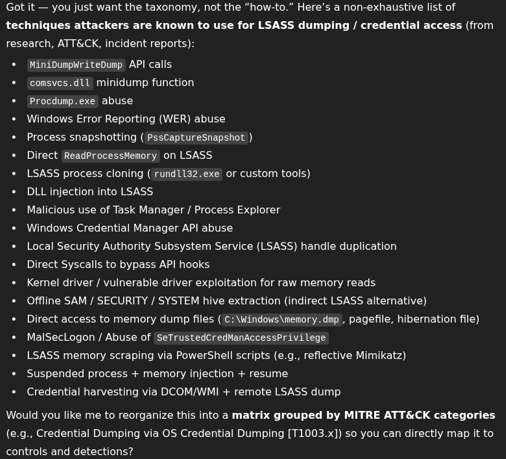
That’s a lot to monitor and there is practically no way an EDR will be able to catch all of these things. But let’s say it does. It wouldn’t actually matter anyway because attackers have grown more sophisticated. If we can’t dump LSASS because it is overly protected, let’s find other techniques we can use to compromise admin accounts!
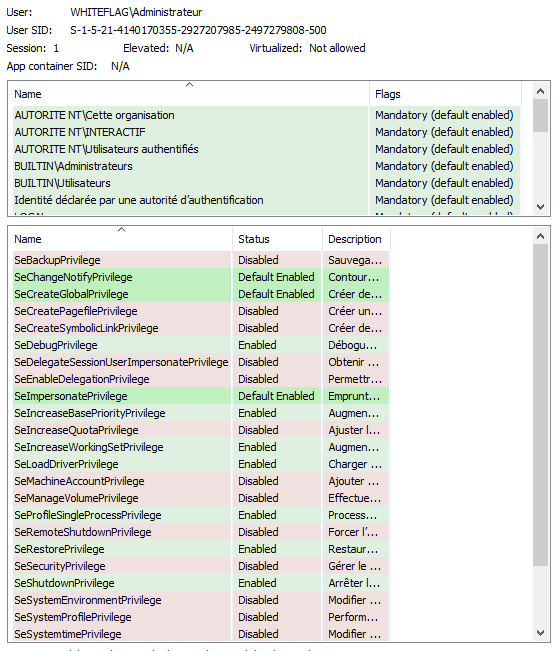
And that’s what Luke Jennings did in 2014 when he developed the Access Token impersonation attack. As Luke described, when a user authenticates on Windows, their password (clear text or NT hash) is validated and stored inside LSASS’s memory. At the same time the system creates a structure called a primary token that holds information about the user such as its name, its SID, its group memberships and, most importantly, its privileges:
Every time a process is created by that user, this primary token is duplicated and linked to the new process:
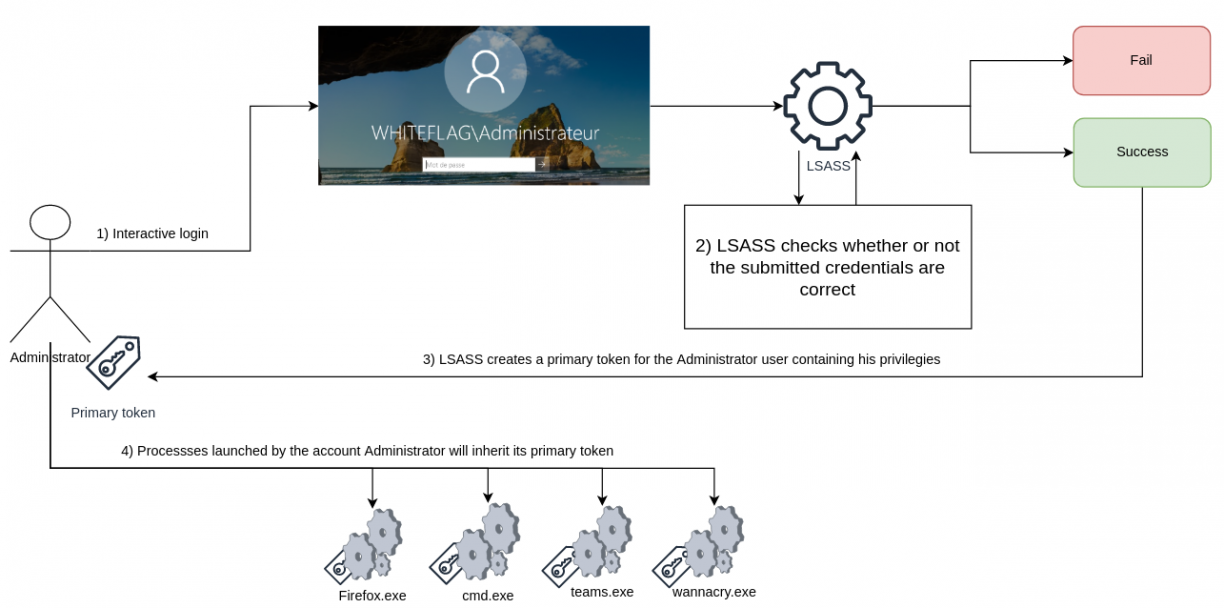
That way, when a process runs a task, the OS doesn’t have to ask who runs the process and check if the users has got the permission to realize that action. It only has to check whether the primary token linked to the calling process can or not. Pretty convenient right? But that implies a huge security issue which is that if attackers get hold of that token and create a new process linking that token, the system will treat the process as being spawned by the usurped account. And that is how we can now usurp accounts without touching the LSASS process or triggering EDR’s:

Doing so, an attacker can actually execute actions both locally on the compromised system but also remotely. That attack demonstrates that possessing the user’s password is not necessary. What we really need is their security context. To illustrate that, I wrote a simple tool called Impersonate which I directly integrated into the all-mighty NetExec framework. Below is an example of an access token being hijacked to steal the Administrateur’s account security context and run commands on its behalf:
Pretty class right? Hopefully, even that technique is now being detected by security tools. Indeed, token impersonation is a complex attack that requires executing either advanced PowerShell command lines or deploying a binary that will look for these tokens across the system, steal them and run commands on behalf of someone else. That’s a lot of things that can be monitored and blocked by the blue team. As such, EDRs now catch these things. Hopefully I still have a few techniques that are not well known and allow usurping someone’s security context:
- Shadow RDP
Back in the day, there was a feature that allowed hijacking someone’s RDP session the moment you have got NT System privileges over the system. Literally it was possible to simply ask the OS to switch your RDP session to the one of another user. That was absolutely insane. So insane that Microsoft removed it.
That said, it’s not over. They removed RDP hijacking but left the RDP shadow feature that still lets a local admin view and interact with another user’s session. It doesn’t fully “take over” the session the way RDP hijack did, but it still grants access to the target’s remote desktop session which is enough to do some damage.
By default, this feature is disabled but you can enable it creating the following registry key:
HKLM\Software\Policies\Microsoft\Windows NT\Terminal Services\ShadowAnd setting one of these values:
- 0, disabled: disables Shadow RDP
- 1, EnableInputNotify: enables remote connection with interaction but requires user’s permission
- 2, EnableInputNoNotify: enables remote connection with interaction and doesn’t require user’s permission
- 3, EnableNoInputNotify: enables remote connection without interaction but requires user’s permission
- 4, EnableNoInputNoNotify: enables remote connection without interaction and doesn’t require user’s permission
Obviously the most interesting value is “2” since it allows us watching and interacting with a user’s session without them having to allow it or not. Being a lazy hacker, I also wrote a NetExec plugin in case you need to enable the feature yourself:

Effectively allowing you usurping a target’s RDP session:
From there, you will be able to use the usurped RDP session to run commands on behalf of another user. See, no malicious attack, no malware bypassing EDR’s with whatsoever new sophisticated technique. Just a regular Windows internal mechanism being hijacked by a lazy hacker.
- Scheduled tasks
The second mechanism I love is scheduled tasks. The thing with scheduled task is that when creating one, you can specify which user’s account it should run as:
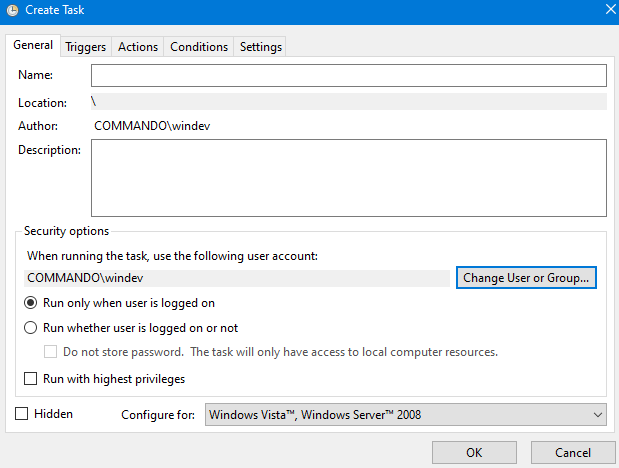
If your target is not connected, you will have to provide its password in order to run the task. But if he is connected, you won’t need anything else. That means you can impersonate absolutely whoever you want as long as they are connected on a server you have local admin rights. And of course, I also wrote a NetExec module for that, schtask_as:
Pretty dope right? Now imagine all the crazy things you can do with such a feature. For example, you may know that Windows popup asking you to authenticate on the domain:
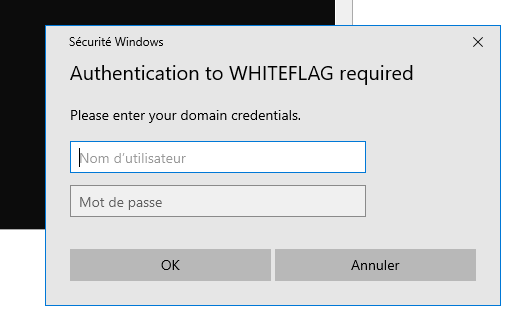
This popup uses standard Windows functions that we can call ourselves using some lines of C# code, for example:
static void Main() {
    string domainName = Environment.UserDomainName;
    var credui = new CREDUI_INFO();
    credui.cbSize = Marshal.SizeOf(credui);
    credui.pszCaptionText = "Authentication to " + domainName + " required";
    credui.pszMessageText = "Please enter your domain credentials.";
    credui.hwndParent = IntPtr.Zero;
    credui.hbmBanner = IntPtr.Zero;

    uint authPackage = 0;
    bool save = false;
    IntPtr outCredBuffer;
    uint outCredSize;
    uint result;

    bool credentialsValid = false;

    while (!credentialsValid){
        result = CredUIPromptForWindowsCredentials(ref credui, 0, ref authPackage, IntPtr.Zero, 0, out outCredBuffer, out outCredSize, ref save, CREDUIWIN_GENERIC);
        if (result == 0){
            var username = new StringBuilder(100);
            var password = new StringBuilder(100);
            var domain = new StringBuilder(100);
            int maxUserName = 100;
            int maxPassword = 100;
            int maxDomain = 100;

            if (CredUnPackAuthenticationBuffer(0, outCredBuffer, outCredSize, username,& ref maxUserName, domain, ref maxDomain, password, ref maxPassword)){
                if (ValidateCredentials(username.ToString(), domain.ToString(), password.ToString())){
                    credentialsValid = true;
                    Console.WriteLine("Valid credentials: " + domainName + "\\" + username.ToString() + ":" + password.ToString());
                }
            }
        }
        else{
            Console.WriteLine("Credential prompt failed or was canceled.");
            break;
        }
    }
}
Simple code, right? Now, imagine coupling this binary with the scheduled task mechanism and you will be able to ask a user to authenticate directly on their Windows session:
And that’s how you get the admin’s password through social engineering. Last but not least, the latest pull request I did on that module allows requesting a PFX via a scheduled task on behalf of another user. Doing so, you will be able to obtain a certificate that you can use to authenticate on the Active Directory network as the usurped user, see below:

And once again, we are able to usurp a privileged account by hijacking a legitimate Windows mechanism.
So what’s the point of these demos? To prove that it’s not because LSASS is protected that your accounts cannot be compromised. LSASS is a target among others and if it can’t be dumped, hackers will either find a bypass or others techniques. As such, building your entire security over tools is unwise, as they will inevitably fail at some point.
The only truly reliable defense is a network that is secure by design. Question is: how de we build one ?
II / Managing Access Control and authentication restrictions
Usually, a tiering model is defined as a hierarchical framework that classifies resources, users, or privileges into distinct tiers, where each tier dictates specific capabilities, restrictions, and trust boundaries. Tiering model usually relies on three layers:
- Tier 0: Domain admins, privileged accounts, groups and containers, management servers (ADCS) and backups / hypervisors infrastructures
- Tier 1: Server administrators, servers’ LAPS accounts, business servers
- Tier 2: Computer administrators, computers’ LAPS passwords, unprivileged users, printers, necessary services (filers, shares, web apps), etc.
Furthermore, to ensure privilege segmentation, it is mandatory that users from one tier cannot connect to assets from another one (upper or lower). Schematically, this is what a minimalistic tiering model looks like:
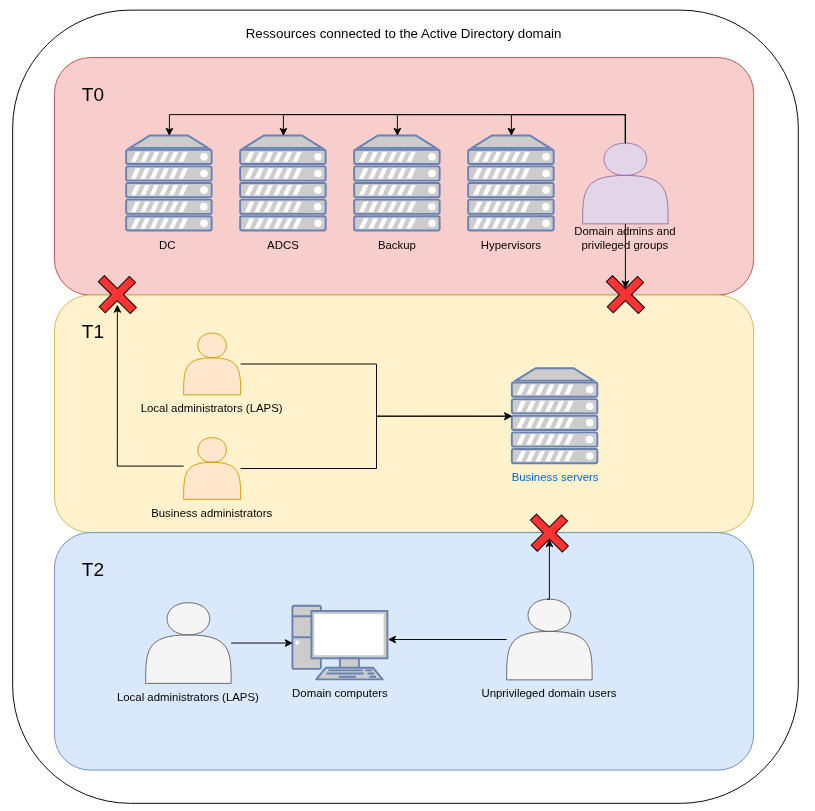
With such an infrastructure, domain admin accounts cannot be compromised through tier 1 or tier 2 assets, since they are fully isolated. However, this model has a critical weakness: both hypervisors and backup systems are joined to the domain and reside in tier 0. That setup offers little real resilience. A single new 0-day vulnerability, such as NTLM reflection, will allow an attacker to compromise domain controllers, escalate within tier 0, and take over hypervisors and backup servers. In that scenario, the attacker can erase the entire domain along with all backups. Game over again!
That led me into thinking of adding an additional layer, a T-1 layer, the one that holds both the hypervisors and backups infrastructures that are not joined to the domain:
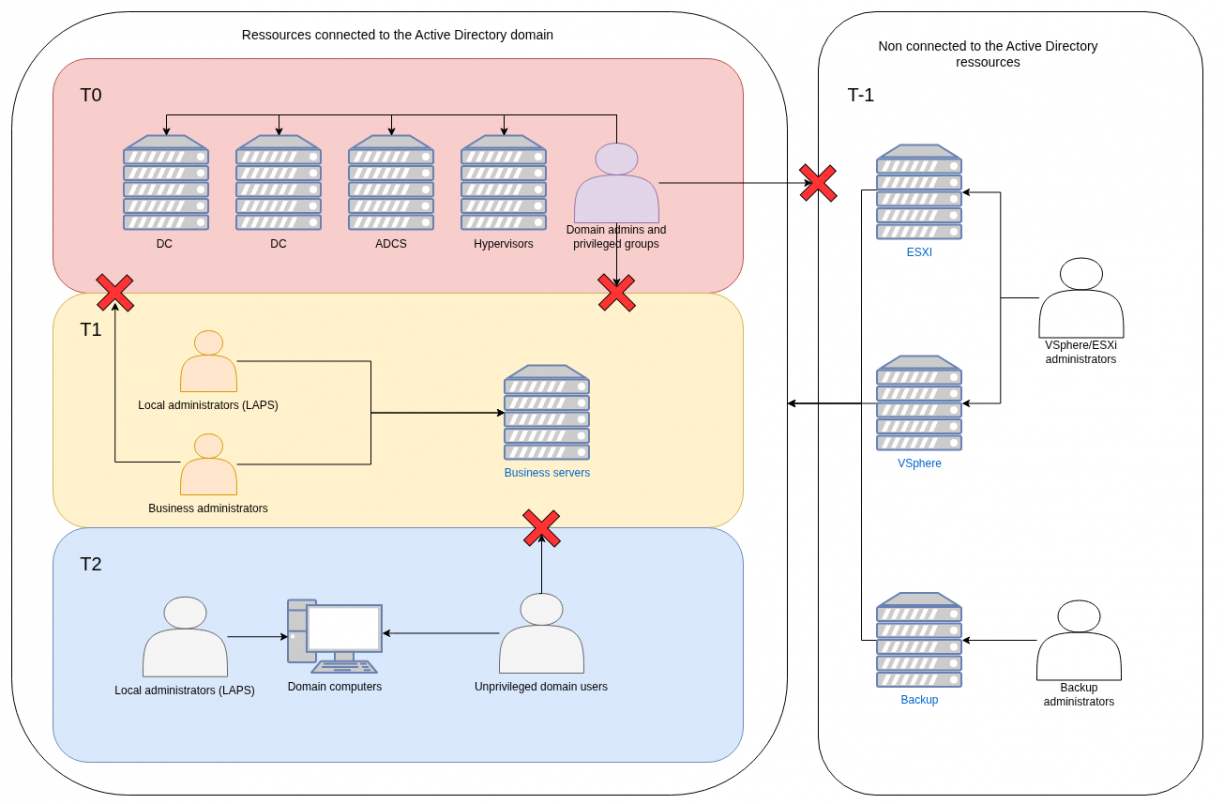
In order to administer these assets, I recommend having local accounts for which passwords are stored inside a physical vault. I have seen clients storing these passwords inside KeePass vaults stored on IT SMB shares and here is how I compromised the vault:
- Shadow RDP a admin session on which the KeePass vault was already unlocked
- Found the KeePass password or key in the IT share
Don’t store these passwords in KeePass or at least don’t store them on the assets joined to the domain.
Alright, at this point we know what each tier is but we still need to determine where our assets belong to. That’s a complicated question but hopefully people already started thinking about it and created dedicated lists like, for example, the SpecterOps team.
I also believe you can use the following logic to classify your assets:
- Tier -1: contains servers, services, and accounts dedicated to storing infrastructure and backups, intended to restore the domain if every other tier is compromised
- Tier 0: contains domain administrators, privileged groups and critical servers or services that manage the domain as a whole
- Tier 1: contains business application administrators (e.g. database admins) and servers or services directly supporting the company’s core business operations
- Tier 2: contains end-user workstations, workstations administrators, and everyday devices such as printers
This logic makes it easy to distinguish tier 2 and tier 0 from the rest. The real challenge lies in deciding whether an asset belongs to tier 1 or tier 0. Take the ADCS server, is it tier 1 or tier 0 ? To answer that question you can ask yourself: “If this asset were compromised, would it allow an attacker to compromise assets in a higher tier?”. Doing so, you’ll realize that a compromised ADCS server would allow an attacker crafting certificates on behalf of any user on the domain via the certsync tool for example, and thus allow the compromise of all accounts including domain admins. As such, this asset should sit in tier 0.
III / Managing network accesses
Managing network accesses is probably the hardest part when it comes to building a proper tiered model for a simple reason: for each asset in your domain, you will have to determine to which users it should be exposed. Let’s take some examples:
- The HR web application exposed on a Microsoft IIS server:
HR people sit in tier 2, they use tier 2 computers and as such, that web application should be accessible to tier 2 assets.
- The MSSQL database hosting the HR web application data:
Databases are managed by sysadmins and there is no reason a tier 2 user should even try to connect to them. Furthermore, If a vulnerability on the database itself was found, an attacker could use it to elevate from tier 2 to tier 1 thus breaking the tiering model. As such, database access should be reachable from tier 1 alone.
- Administrative services such as RDP, WinRM, SSH, Tomcat and JBoss interfaces:
These allow administrating servers or pushing applications. As such, these should only be exposed to tier 1 or tier 0 depending of whether the server is an administration server (tier 0) or a business server (tier 1).
- What about domain controllers ?
The domain controller is the most critical server in Active Directory, but it must remain accessible to all domain users. Blocking network traffic from tier 2 users to domain controllers would prevent asset management and stop tier 2 users from authenticating. The solution is not to expose all services to every tier. For instance, you can allow tier 2 access to SMB, LDAP, Kerberos, and RPC ports for authentication and GPO retrieval, while restricting WinRM, RDP, and all administrative services exclusively to tier 0.
A side note. When it comes to exposing services, it’s equally important to publish only what’s strictly necessary on the internal network. If the HR web application and its MSSQL database run on the same server, there’s no reason for the database service to be network-accessible, keep it local. The same applies to Tomcat management interfaces: if administrators deploy applications directly on the host, the Tomcat service should only listen on localhost.
When building your tiering model, ensure you strictly control which services are exposed on your internal network. Tools like Nmap can help identify and manage this exposure and make sure nothing was left behind! :)
In addition to specifying which tiers can access which services, one effective security measure I observed from a savvy client was the use of private VLANs.
The concept is straightforward: each server is placed in its own private VLAN. Tier 1 servers cannot communicate with other tier 1 servers unless they form a functional pair, such as a web server and its corresponding database.
This approach proved highly effective as compromising one of their tier 1 server did not allow of moving laterally and compromise others servers:
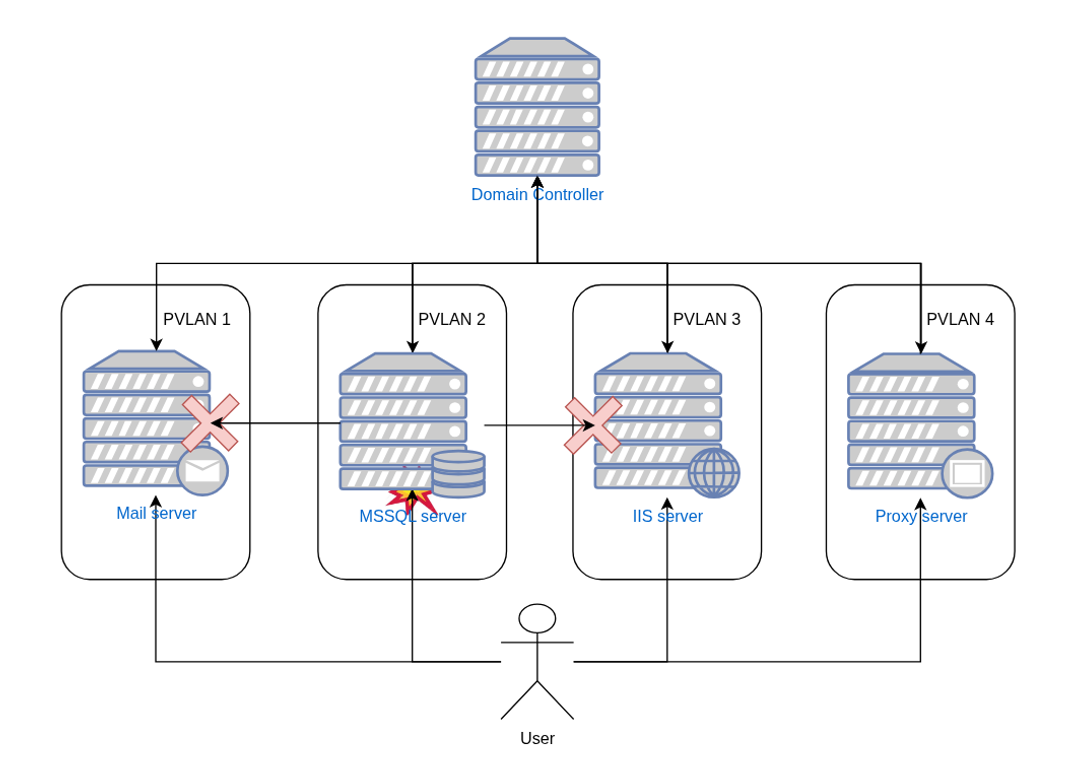
As such, we found ourselves stranded with admin rights on an isolated tier 1 server, somewhere on their internal network…
IV / Theorical tiering model diagrams
When I began designing the most secure infrastructure I could imagine two years ago, I quickly realized that adding security significantly complicates administration. I then focused on finding an architecture that balances security with manageability. The first diagram I created was based on implementations I had seen across multiple clients:
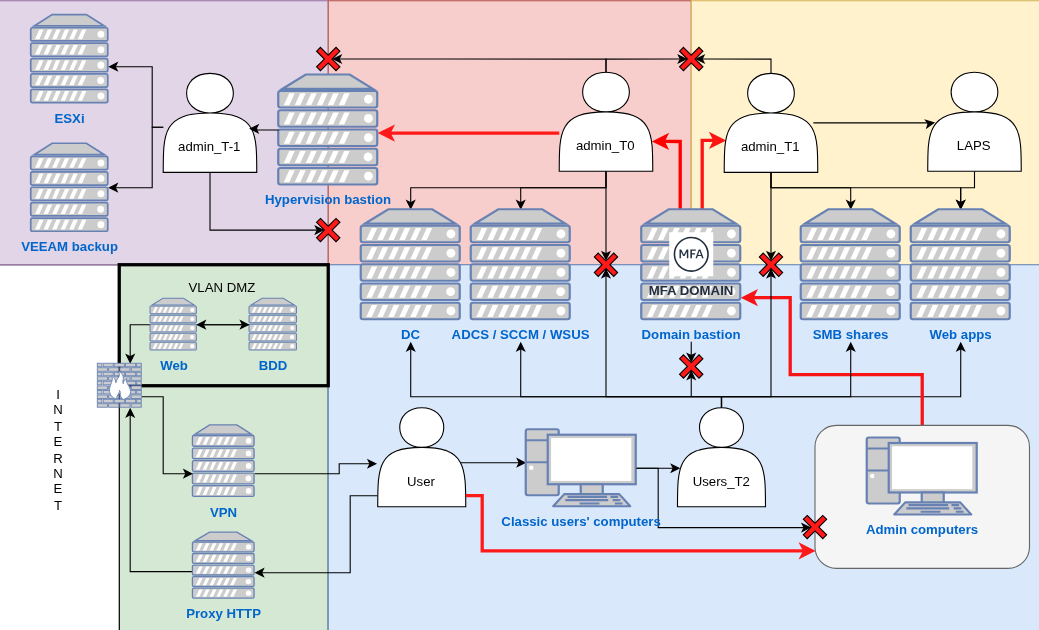
Initially, I thought this diagram was solid: each tier was properly isolated, could access only specific servers and services, and all privileged access went through a bastion that enforced restrictions. This setup was already better than most I had encountered. However, two years later, I have to admit it falls short, primarily because of limitations with the bastion which:
1. Is a single point of failure
On the diagram I only added a single bastion which means that if the server crashes, admins cannot administer the domain anymore. Furthermore, if a 0-day pops on the bastion’s software, attackers will be able to compromise it, get access to tier 1, tier 0 and tier -1 assets.
2. Is a complex asset to configure and protect
Most bastions use web interfaces where administrators log in with credentials plus an MFA token. If those admins work from machines in tier 2, an attacker who compromises one of those machines can hijack the admin’s browser, exfiltrate bastion session cookies, and impersonate the admin to the bastion. This is practical, I’ve performed this attack multiple times, and real-world breaches follow a similar pattern.
So yes, the initial design was better than most but it still fails for one simple reason: privilege flow. Administrators live in the same tier as regular users, so privilege can flow upward from an unprivileged machine to administrative tiers. If an admin’s machine is compromised, the attacker can follow that flow.
As such we must, at minimum, separate administrative users from regular users. Below is an upgraded model:
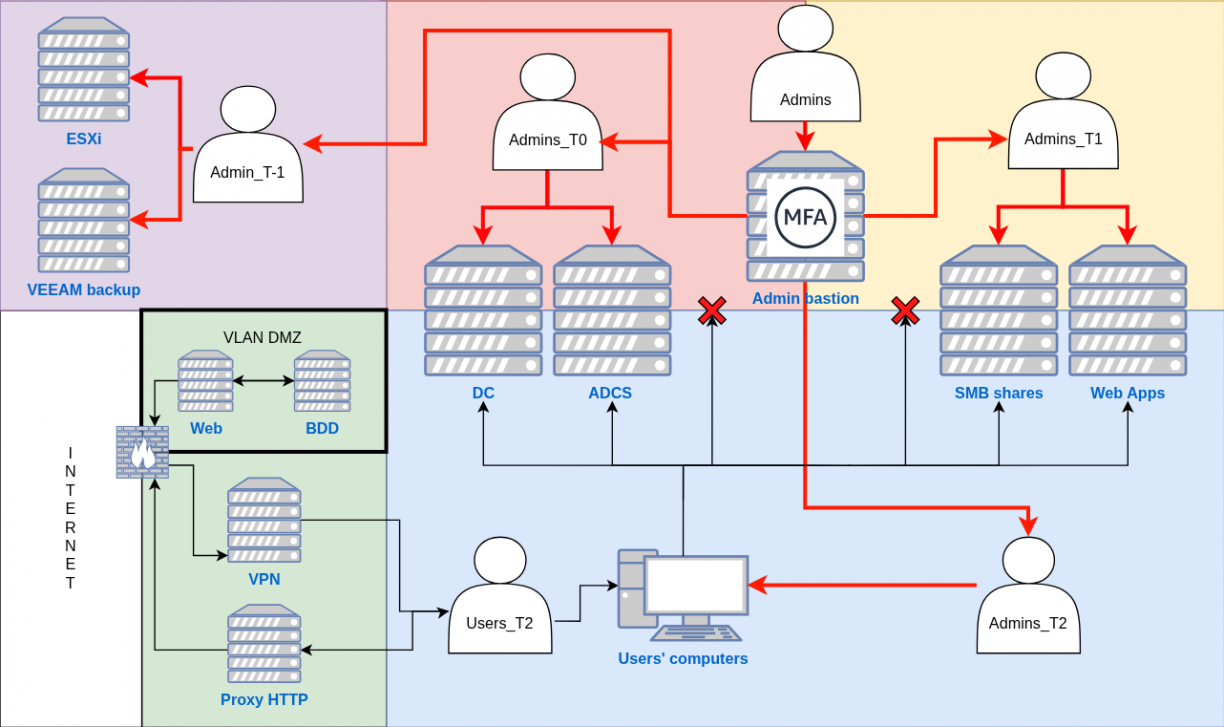
In that model, administrators, whether they are tiers 2/1/0 or -1 are all sitting in a completely different network that is not reachable by any regular tiers 2 users which, honestly, are the ones that are targeted by APT and red-teamers. Each of these admins need to connect to a bastion, located in the administrative network as well, from which they will be able to connect to servers or computers they need to administer.
A practical gap remains: administrators need Internet access for mail, collaboration tools and updates. That access exposes them to phishing and zero day risks. As such, and even if the probability is low, we must design the network and the bastion workflow to contain that risk rather than ignore it.
The question is: how can we give sysadmins Internet access without putting their critical admin machines at risk? Usually, the answer is to provide at least two physical computers, one for administrative tasks and one for regular use. But managing two machines is cumbersome. A better approach is to use a Remote Desktop Services (RDS) server, allowing admins to connect to a virtual desktop or specific applications via their tier 2 accounts. Doing so, they can perform Internet-facing tasks from an isolated environment running in tier 2 and keep their high-privilege administrative systems secure. Two possibilities: expose an entire virtual desktop (pretty much like a VM), or expose specific applications such as Edge:
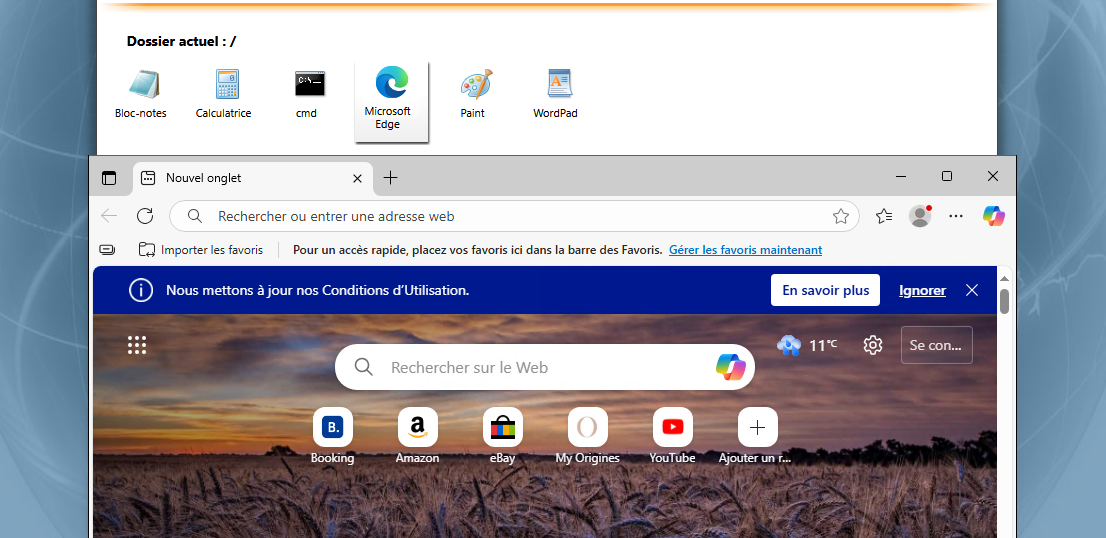
Doing so, if an attacker exploits a browser’s vulnerability, for example, they will only get access to a tier 2 virtual desktop, keeping the privileged tiers out of reach. Below is the upgraded diagram:
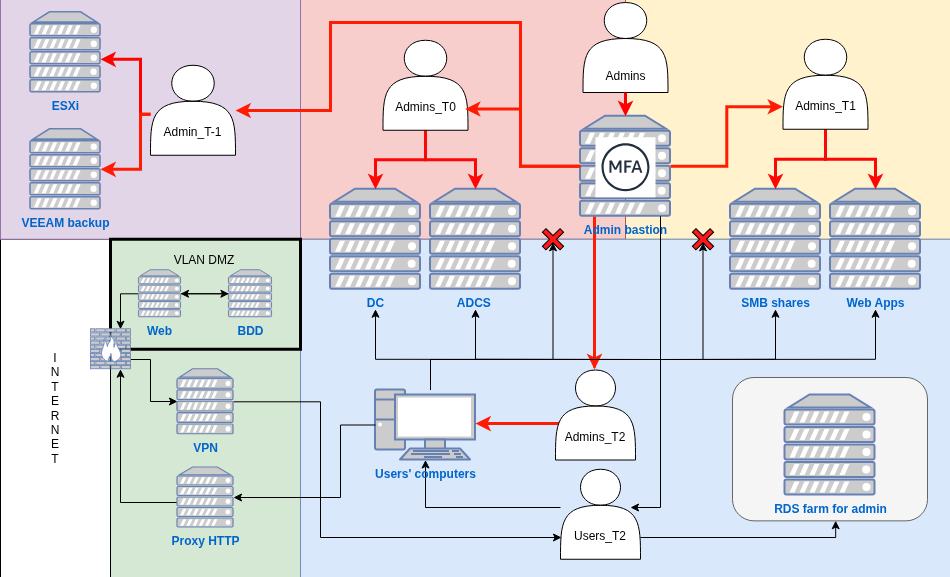
However, this setup doesn’t fully address Entra ID management, which requires Internet access for its web portal. The challenge is enabling admins to manage an Internet-facing service with admin credentials without giving full Internet access or breaking tiering by using RDS.
The solution is to restrict the admin workstation to only the URLs needed for Entra ID administration. This prevents browsing or accessing other sites, minimizing exposure while preserving the tiered security model.
The previous iteration of our tiering model is great. We have our admins located in a specific area of the network that cannot be reached by regular users, they have hardened admin workstation that they can use to manage EntraID and RDS services they can use to browser the regular Internet. Privileges flow downstream making it practically impossible to elevate to upper layers.
But still, it’s not perfect. If an attacker manages to break into tier 1 because of an unprotected Tomcat and/or a new 0-day targeting a specific protocol, he will be able to reach tier 1 and 0 assets. At this point we have three solutions with both pros and cons:
- Accept the risk of having both tier 1 and tier 0 administrators and assets in the same network. I definitely do not recommend that.
- Create a specific isolated network for tier 1 assets. Doing so we make sure that if a server is compromised, the attacker will not be able to reach tier 0 assets, which are the most important ones. But that makes administration much more complicated as administrators managing both domain and business assets will have to use two workstations, one located in the tier 0 network, the second being in the tier 1 network. I personally believe it’s too complicated.
- Create a dedicated tier 0 network and a separate tier 1 network that also hosts tier 2 assets. This is the simplest approach and likely the most practical for small companies. The principle is to assume that tier 1 assets will eventually be compromised, because, realistically, new vulnerabilities appear every day and cannot be fully prevented. For that reason, and if implementing a more complex tiering model is not possible, I recommend at least setting this one:
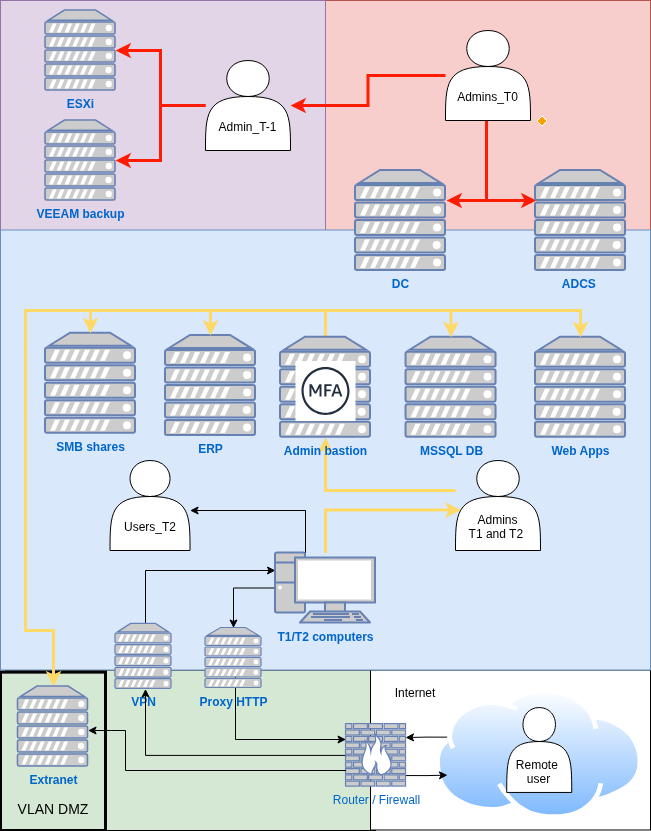
As long as no Active Directory misconfiguration allows privilege escalation from unprivileged users to domain admins (for example: ESC1) and tier 0 assets are properly secured and isolated, this model should be sufficient. However, it’s not the most secure approach, and if either of these conditions fails, the entire domain can be compromised. Additionally, passwords for tier -1 assets must never be stored within the domain. Keeping tier -1 systems inaccessible to domain admins ensures that the domain can be rebuilt if it is ever encrypted by ransomware.
Alright so far, we’ve identified four models:
- The flat network that should never be used
- The downward privilege flow, where admin privileges extend into lower tiers
- Tier 1 and tier 0 isolated within the same network
- Tier 0 fully isolated, with all other tiers grouped together
I have one last one, the “final boss” of tiering architectures that relies on a dual-forest setup, each hosted on its own isolated network: one for administration and one for business operations.
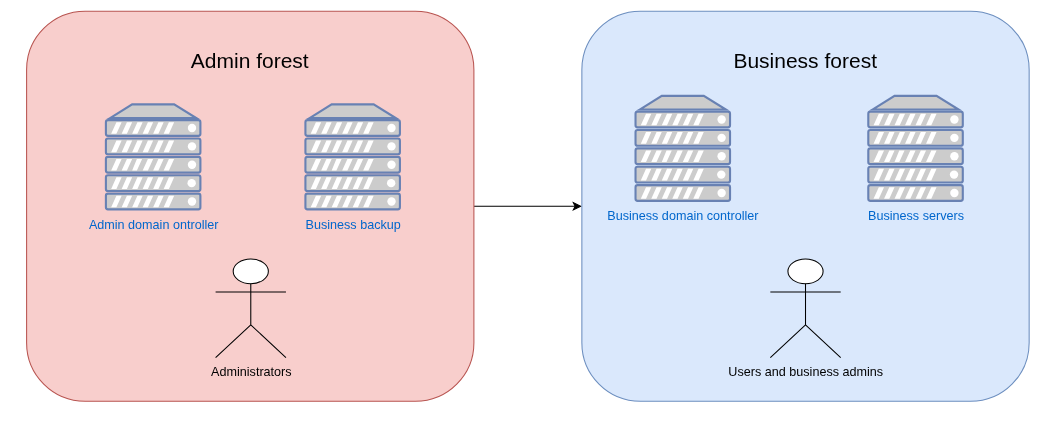
With this setup, admins are physically located on the admin forest and can connect, via a bastion, to the business forest with their respective business tiers -1/0/1/2 accounts. As such, these admins accounts remain safe even if the business forest is compromised because there is, or at least there must be since Charlie Clarck research, no trust between these two forests.
Without further discussion, here is the final diagram:
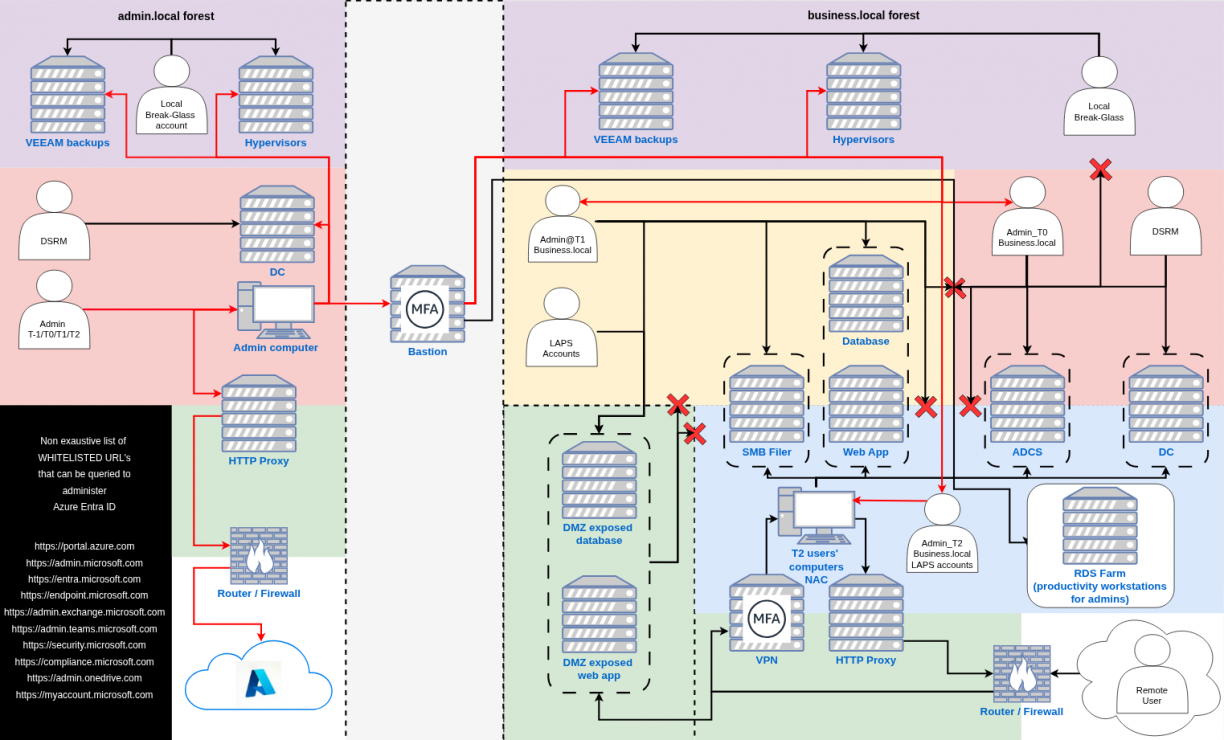
As I said, this model is much harder to set up but it is also the most secure one and I practically see no way an attacker could compromise both forests considering there is clear isolation between both of them.
Let’s take a simple example: a user in the business forest gets infected. What does the attacker do? They search for clear text credentials, vulnerable services, or any way to move laterally. In this setup, the worst they can achieve is compromising the business forest and obtaining domain admin there. That’s serious, but they can’t reach the admin forest, the true core holding hypervisor and backup privileges. Indeed, backups are the last line of defense in a ransomware attack. If attackers can’t access them, they can’t destroy the company. They might still exfiltrate data, but they can’t wipe everything out since business forest backups can be stored on the admin forest.
Side note… again. Backups are really, REALLY important. As such it is recommended to have as many copies of these as possible. For example you can have one copy on the backup infrastructure, one copy on a network disconnected server and one copy on the cloud. That applies no matter what tiering model you decide to set up.
Furthermore, in a properly tiered model, an attacker breaching tier 2 should only reach public SMB shares or common web apps used by employees. They should not touch any critical databases, admin consoles, or remote access services. Those belong exclusively to tier 1 and above, where access is tightly restricted.
Finally, since privilege flows downward and admin’s computers cannot access Internet beside EntraID endpoints, there is practically no way an attacker could get access to even a admin account in the admin forest. As such, privileged users are effectively safe.
V / Is a tiering model enough ?
Windows security research evolves constantly. New attack techniques appear every day. Can defenders truly keep up? Realistically, no. It’s always easier to attack than defend, attackers need one working exploit, while defenders must stop them all.
A properly implemented tiered model doesn’t make you invulnerable, but it raises the cost of compromise. Attackers blocked from sensitive data or admin systems are forced into noisier methods, brute-forcing accounts, Kerberoasting, or similar. These are detectable. When attackers must take risks, that’s your chance to identify and remove them. Adding layers of deception, such as honeypots, can further exploit their greed and impatience. Still, no network is ever fully secure. Even the strongest defenses can fall to state-sponsored groups with patience, resources, and fresh zero-days.
Remember: domain admin access isn’t always the attacker’s goal. Data exfiltration often requires far less. That’s why both internal security assessments and red team exercises are essential. The first helps reduce your attack surface and misconfigurations while the second tests your detection and response against real-world intrusions. Together, they reveal blind spots and prepare your teams to respond effectively when compromise happens.
VI / Conclusion
To be honest, I’m not a senior Active Directory sysadmin nor am I an omniscient person. Still, I wanted to provide some thoughts about what I believe would be a good internal architecture and what mistakes you could make that would allow an attacker to compromise your environment.
That said, these models are probably not perfect. As such, if you ever find a hole somewhere, don’t hesitate reaching out to me. I’ll gladly take any feedback that could help improve them and secure a little bit more each and every version.
Happy hacking, and defending, folks!
This is a cross-post from https://blog.whiteflag.io.